
The Team

Iza Gilson
Born in far away Poland, Iza moved to Campbell River over 30 years ago and never looked back. She's been providing IT support in this area for all of this time, mostly as a self-employed consultant. She came to know many wonderful people, lots of whom became friends over time.
IZCO Technology Solutions is her latest endeavor. She feels very lucky to have teamed up with her business partner, Corey – and that is how IZCO was born.
They both share a passion for new technology and helping people which they believe is a recipe for success in today’s technology field.
Iza handles most of the sales and keeps our service department somewhat on track. She has also been known to do the occasional support call (which is in fact her favorite part of the job).
The rare time that Iza is not working, she loves to hike, read and cook.
Corey Magowan
Corey Magowan has worked in Information Technology since 1999. One of his first jobs was making sure the lights would stay on January 1, 2000. Corey met Iza in 2012 and has been working with her ever since.
Corey has worked supporting corporate environments with servers and workstations, helped develop custom software, been a database administrator for Microsoft SQL, maintained Dynamics, when it was owned by Great Plains. He is also familiar with smaller one to ten person setups and the challenges those might present.
Corey has been living in Campbell River since 2008, when he moved here with his young family. When Corey isn’t working, you can usually find him somewhere in the backwoods walking his dog or riding his bike.


Dave Shook
Born in Toronto, with a stint in Ottawa, Dave grew up on the South Shore of Montreal. After finishing his Bachelor of Science at Concordia University in Montreal, he came west in 1975, and obtained his MBA at UBC in Vancouver. He fell in love with BC and has stayed living on the island for the last 45 years or so.
Dave became a partner in Odyssey Computers in 1990 and moved from Victoria to Campbell River with Odyssey Computers in 1997. In 2019, he and his partners sold Odyssey Computers to the folks at Izco Technology Solutions. Now he gets to do what he enjoys most – help the people of Campbell River by fixing their computers for them. Dave is now the main Bench Technician in the Shop here at Izco Technology Solutions.

Jonathan Pistone
At IZCO Technology Solutions, Jonathan is our Network/Project Guy. You can find him looking after our clients’ networks, while providing expert support.
Born in Los Angeles USA, he moved with his family to Nanaimo, BC, when he was seven. Since then, he’s never strayed far from Vancouver Island, except for some adventures here and there.
While his schooling started in electrical engineering, Jonathan's passion for networking, servers, and everything in-between lead him to working in the IT industry for the past 17 years.
Out of the office, Jonathan enjoys walking his dog along the Sea Walk, hiking out to waterfalls, or mountain biking at Snowden Forest.

Chad Laity
Chad joined the IZCO team in early 2023 after relocating from Chilliwack. He’s been working in technology in BC since earning his Network & Systems Engineer Degree back in 1998. Outside of work Chad enjoys all things outdoors including off-roading, hiking, biking, technology, Mocha’s from Stonehouse Tea and Coffee Shop, and spending time with family and his chocolate lab.
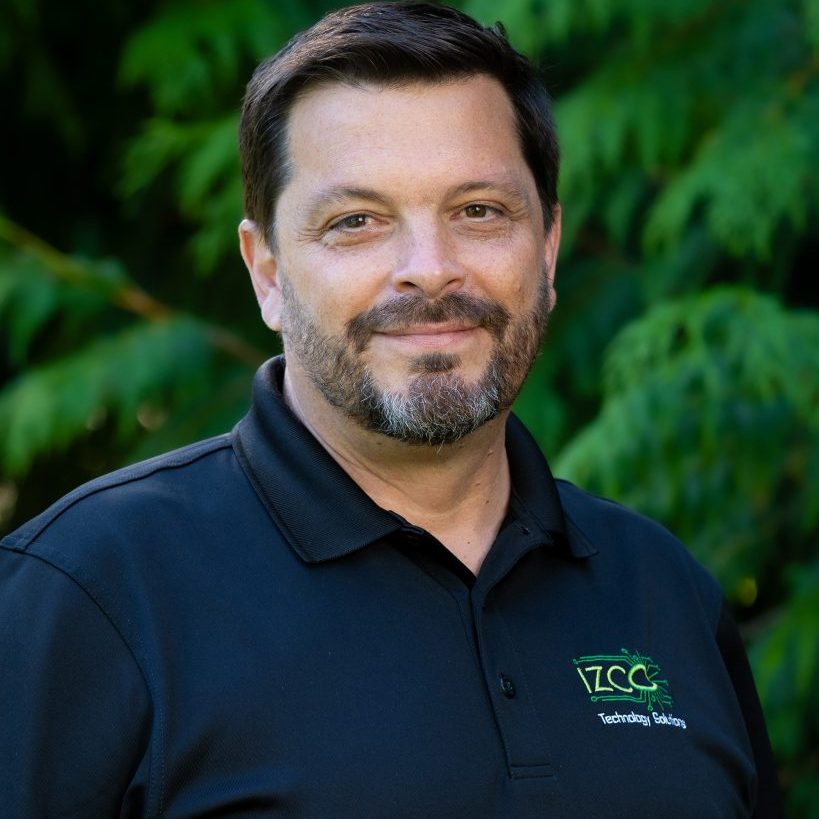
Cameron Ross
With an upbringing in Ontario and Bermuda, Cameron joined IZCO in August 2024, after working in IT related jobs since 1993. After his BSc. program in Physics at WLU, he started his technology roots in the hospitality industry. Cameron went on to run his own computer service business in the BC Interior since 1995. He brings a diverse IT background to IZCO with CompTIA Network+ and A+ certifications along with a wide variety of vender certifications with Lenovo, IBM, Dell, Lexmark, and many others.
Cameron's hobbies include robotics and 3D-printing projects, and he can often be found bringing his full-size replica of R2D2 to many charity events around the province. Recreation time is spent outdoors with family and his white Lab, Mando.

Harrison Huson
Harrison joined IZCO team in June 2025 – His roles include setting up computers, users, maintenance, troubleshooting and replacing hardware. He grew up right here in Campbell River and got interested into IT & electronic back in Grade 5 when he got introduced to block coding. That initial curiosity quickly turned into a hobby, especially after he began modding video games with a friend. Over the years, his fascination with computers deepened, and he soon became the go-to tech support for family and friends.
When he’s not at work, Harrison enjoys spending time with his friends. He also loves building video games and diving into whatever creative side project happens to grab his attention.

Kabo Kakabale
Kabo joined our team in August 2024 after relocating from Botswana to Campbell River. She holds a bachelor’s degree in finance (2019) and a Postgraduate Diploma in Higher Education (2020). Her role includes bookkeeping, administration, payroll processing, managing accounts payable and receivable, preparing quotes and invoices, answering calls, and ordering supplies. She also supports marketing efforts from time to time.
Outside of work, Kabo enjoys watching movies, dancing, visiting new places and interior decorating.

Security / Concierge
When they aren't busy napping, Louise and Harvey enjoy greeting customers and looking for security risks.
Get the latest news
Join the growing number of business owners and home users that are staying updated with the latest tech news from our Blog. Subscribe to our newsletter to get curated articles and tips that will help you stay secure and connected.

What is Zero-Click Malware? How Do You Fight It?
In today’s digital landscape, cybersecurity threats continue to evolve. They pose significant risks to individuals and organizations alike. One such threat gaining prominence is zero-click malware. This insidious form of malware requires no user interaction. It can silently compromise devices and networks.One example of this type of attack happened due to a missed call. That’s…

How Much Device Storage You Need: A Comprehensive Guide
Device storage decides how many applications, photos, and files you can retain on your device. When you run out of storage, it can affect your productivity and device performance. But finding the right storage amount isn’t always easy. We can underestimate what we need or get too much storage. This guide will help you figure…
Is Your Smart Office a Security Risk? What Small Businesses Need to Know About IoT
Your office thermostat, conference room speaker, and smart badge reader are convenient, but they’re also doors into your network. With more devices than ever in play, keeping track can be tough, and it only takes one weak link to put your entire system at risk. That’s why smart IT solutions matter now more than ever.…

Digital Defense: Essential Security Practices for Remote Workers
The rise of remote work has redefined the modern workplace. Gone are the days of rigid office schedules and commutes. But with this flexibility comes a new set of challenges – cybersecurity threats. Remote work environments often introduce vulnerabilities to your organization’s data and systems. 73% of executives believe that remote work increases security risk.…

5 Cybersecurity Predictions for 2024 You Should Plan For
Cybersecurity is a constantly evolving field. There are new threats, technologies, and opportunities emerging every year. As we enter 2024, organizations need to be aware of current and future cyber threats. Businesses of all sizes and sectors should plan accordingly. Staying ahead of the curve is paramount to safeguarding digital assets. Significant changes are coming…

Securing Your Supply Chain: Practical Cybersecurity Steps for Small Businesses
Picture this: your business’s front door is locked tight, alarm systems are humming, and firewalls are up, but someone sneaks in through the back door, via a trusted vendor. Sound like a nightmare? It’s happening more often than you think. Cybercriminals aren’t always hacking directly into your systems anymore. Instead, they exploit the vulnerabilities in…
Why Your Employees Shouldn’t Have Administrator Access to Their Computers
Summary: Employees should use standard accounts for email, web browsing, and everyday work. Administrator access should be limited to approved IT tasks and protected with a separate account. Administrator access often starts with one request. An employee needs to install a printer, update a specialist program, or change a setting on their computer. Giving them…

Don’t Let Outdated Tech Slow You Down: Build a Smart IT Refresh Plan
Nothing throws off your day like a frozen screen or a sluggish computer. If you run a small business, you’ve probably dealt with outdated tech more than once. Sure, squeezing extra life out of old equipment feels economical, but it often costs more in the long run. Small businesses lose approximately 98 hours per year,…

Protect Yourself: 8 Steps to Take When You Get a Notice Your Data Was Breached
When it happens, you feel powerless. You get an email or letter from a business saying someone breached your data. It happens all too often today. Data breaches happen at banks, online sites like Facebook, and ecommerce stores. Not only that, but governments are also victims. This leaves things like your address, SSN, and credit…

How to Use Conditional Access to Grant and Revoke Contractor Access in 60 Minutes
Managing contractor logins can be a real headache. You need to grant access quickly so work can begin, but that often means sharing passwords or creating accounts that never get deleted. It’s the classic trade-off between security and convenience, and security usually loses. What if you could change that? Imagine granting access with precision and…

Slow Systems?
If your computers and network are slowing you down, we can help. By running diagnostics and optimizing your operating system and apps we'll determine the cause, provide efficient and economic solutions and get the job done with minimal disruption to your workflow.